#7284 HYPERVISOR Phantom Blade Zero: Deluxe Edition v301524-17219 + 2 DLCs

Genres/Tags: RPG, Action RPG, Third-person, 3D
Company: S-Game
Languages: RUS/ENG/MULTI15
Original Size: 140.6 GB
Repack Size: 110.8 GB
Download Mirrors (Direct Links)
- Filehoster: DataNodes (Speed & Usability) [Use IDM]
- Filehoster: FuckingFast (REALLY Fucking Fast 🙂 )
- Filehoster: FileKeeper.net (a new hoster)
Download Mirrors (Torrent)

Discussion and (possible) future updates on CS.RIN.RU thread
Screenshots (Click to enlarge)


Repack Features
- Based on Steam BuildID 26266538 release: 140.6 GB
- Hypervisor Bypass (INTEL & AMD) by ARTIFACT + Goldberg emu applied over
- Many antiviruses, including Windows Defender are now marking HV files as rootkits, rendering games unplayable. To avoid it either turn off AV completely, or add source/target installation folders to exclusions
- VBS.cmd script v2.0 added
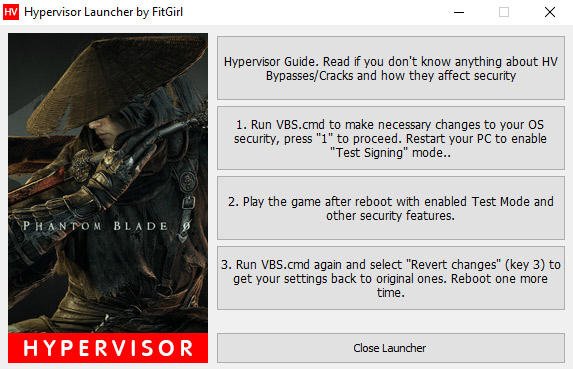
- Custom launcher added for easier HV steps processing
- Game version: v301524-17219; 2 DLCs (Pre-Purchase Bonus & Deluxe Edition Upgrade) are included and activated
- 100% Lossless & MD5 Perfect: all files are identical to originals after installation
- NOTHING ripped, NOTHING re-encoded
- Significantly smaller archive size (compressed from 140.6 GB to 110.8 GB)
- Installation takes from 70 minutes (on 32-threads CPU) up to ~3 hours (on 8-threads CPU)
- After-install integrity check so you could make sure that everything installed properly
- HDD space after installation: 140.6 GB
- Language can be changed in game settings
- Repack uses XTool library by Razor12911
- At least 3 GB of free RAM (inc. virtual) required for installing this repack
Having issues with my launcher?
Then do the following steps manually:
- Make sure you have virtualization tech enabled in your BIOS: VT-x for Intel or AMD-V (SVM) for AMD
- Run “VBS.cmd” in the game folder – you might want to download fresh version here: https://fitgirl-repacks.site/hypervisor-guide/
- Press 1 to make necessary changes to the system
- Reboot to enable “Test Signing” mode. If selection screen appears on boot, press 7 or F7 to disable DSE
- Run “platform/steam/PBZ.exe”
- Play
- Run “VBS.cmd” again and press 3 to revert made changes
- Reboot in the normal, secure mode
What is a Hypervisor Bypass?
Please read this article before proceeding with downloading and installation:
https://fitgirl-repacks.site/hypervisor-guide/